

Effortless Sales Order Revision in Odoo
In Odoo, sales teams often need to revise sale orders multiple times. However, the standard process can make it hard to track changes or identify the exact revision number. This module solves that by providing a clear, revision-controlled workflow. It's especially valuable for companies dealing with unique or high-cost products, ensuring you always have accurate order data for each specific revision.
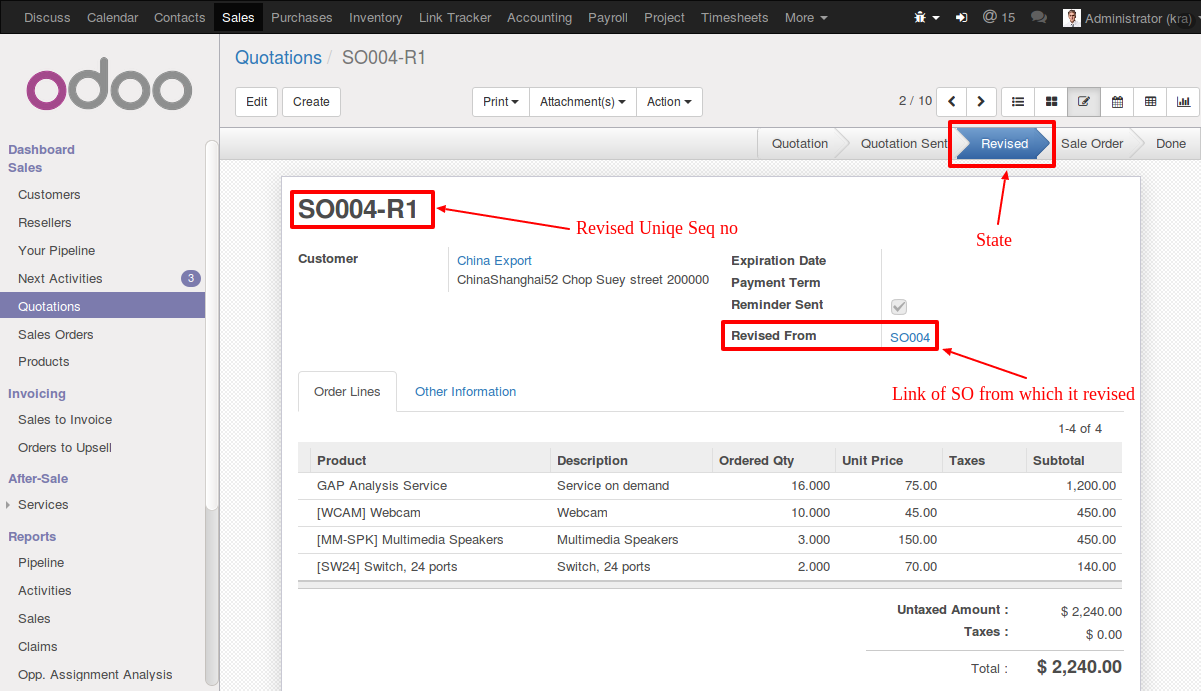
Snapshot of the revised sale order interface

A **"Revise Sale Order" button** is added to the quotation view, allowing users to create new revisions easily.
You can revise quotations in **draft and canceled states**. All revised quotations remain accessible in the Quotations menu.

Each new revision will have a **clear link back to its parent original order**, ensuring full traceability.
New revisions are automatically suffixed with **'-R' and a revision number** (e.g., SO005-R1). The revision number increments with each subsequent revision.
Once an order is revised, the original sale order (e.g., SO005) enters a **"revised" state**, preventing further confirmation or cancellation to preserve historical data integrity.
Configuration & Customization
Designed for Odoo ease-of-use, this module requires zero technical knowledge to deploy. Simply install it and the functionality is ready to use. Our dedicated technical team is available for advanced customization to match your specific requirements.