
⏱ Web Timer Widget
See exactly how long something is taking — right inside your Odoo screen.
A live clock that starts, ticks, and stops automatically.

What does it do?
Imagine a stopwatch built directly into any Odoo form — no separate app, no manual calculation. The moment work begins, the timer starts counting up. When work ends, it stops. The total time is saved automatically.
The display always shows hours : minutes : seconds, updating every second so you always know how long something has been running at a glance.
It is smart enough to keep the time correct even if the computer goes to sleep and wakes up again.
How does it work?
Three things happen automatically — no buttons to press.
Work begins — timer starts
When a start date & time is entered on the record (e.g. a task, appointment, or order), the timer begins counting up immediately. You can watch the seconds tick by in real time.
Timer runs live in the background
While the record is open, the displayed time updates every second. You do not need to refresh the page. If your computer sleeps, the timer automatically catches up when it wakes — no time is lost.
Work ends — timer stops and saves
When an end date & time is set on the same record, the timer stops and locks at the final elapsed time. The total duration is saved in the record for reporting or invoicing.
Where can it be used?
Any place in Odoo where tracking elapsed time matters.
Development Tasks
Developers start the timer when they begin a ticket and stop it on completion. The exact time spent is recorded without any manual entry.
Hospital Consultations
Track how long a patient consultation or procedure is taking, directly on the appointment record, and use it for billing.
Support Tickets
Measure response and resolution times for customer support cases. See live how long a ticket has been open and export totals for SLA reports.
Manufacturing Orders
Record how long each production step or work order actually takes on the shop floor, compared to estimated times.
Events & Venues
Display elapsed time since an event started. Useful for concerts, conferences, or any booking that has a defined start and end.
Any Custom Module
Because this is a reusable widget, a developer can add it to any existing or custom Odoo screen — no new app needed.
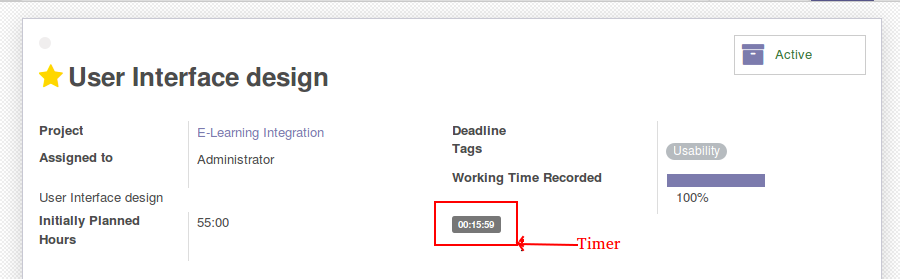
Example — Timer on a Project Task
The screenshot shows what this widget looks like when placed on a Project Task screen. A developer starts the timer when they begin working on a ticket and stops it when done. The exact hours, minutes, and seconds are visible directly on the task — no extra clicks.
ℹ This is an illustration only.
The image above is purely to show how the timer looks on a task form.
The standard Odoo Project module does not include start/stop timer
fields out of the box.
If you want a ready-to-use timer on Project Tasks — with start button, stop button, and automatic time tracking — without writing any code yourself, we have a dedicated module for that:
Project Task Start / Stop Timer → Get it on Odoo Apps
How can we help you?
Support, Queries & Custom Development
Have a question, found a bug, or need us to set this up for you? Reach out — we respond fast.
If links are restricted in your browser, copy the addresses above to connect with our team.
Visit our website for the full module catalogue
WWW.ALMIGHTYCS.COMConfiguration & Customization
Get started quickly with preconfigured healthcare workflows and an intuitive user experience. The system can be easily adapted to match your organization's requirements, and our team is available to help with customizations, integrations, and advanced implementations.