

Skip to Content
Image

Add Products by Barcode in Invoice

9.00 9.00
9.00 ₹

View on Odoo Appstore
Scan product barcodes on invoices to add line items instantly, reducing manual entry errors.Add Products by scanning barcode to avoid mistakes and make work faster in Invoice.

Almighty Consulting Solutions
Supported Editions
Community Enterprise
Supported Hosting
Odoo.sh Cloud On Premise
App can not be used on Odoo Online.

Add Products by Barcode in Invoice.


Add Products by scanning barcode to avoid mistakes and make work faster in Sale order. When barcode is scanned it will First search for related barcode and after that it will check for matching Internal reference.
You can add multiple qty of same product also by scanning same barcode multiple time.

Just Scan Bar-code in form view of Invoice(Product Bar-code/Reference) and it will add new line. If there is already line with same product it will increase qty by plus one.
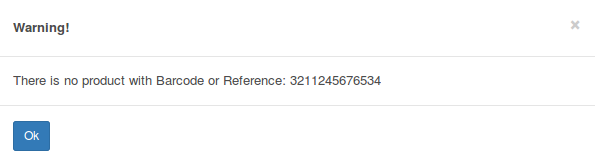
Error message when no matching product found.

Configuration & Customization

Get started quickly with preconfigured healthcare workflows and an intuitive user experience. The system can be easily adapted to match your organization's requirements, and our team is available to help with customizations, integrations, and advanced implementations.


Official Odoo Silver Partner

How can we help you today?

Empower Your Experience with Help, Queries & Support

Please feel free to contact for any suggestion, issue & queries.

Email
info@almightycs.com
Send Inquiry
WhatsApp
https://www.almightycs.com/r/mE3
Message US
MS Teams
https://www.almightycs.com/r/tzs
Join Meeting

If links are restricted in your browser, please highlight and copy the addresses above to connect with our team.

Visit our official website for more details

WWW.ALMIGHTYCS.COM