

Add Selected Product on Sale, Purchase, Invoice, Stock
Default Odoo does not provide an easy way to add multiple products at once. This module enables quick selection and addition of multiple products to invoices, sale orders, and purchase orders, making the process faster.
Module Features
Select multiple products from list view.
Selected Customer/Supplier and order type which you want to create or edit..
You can edit other information of selected products.
Finally Click on Create/Edit record option.
It will Create/Edit Record and open the record so you can work directly on that record.
Note:
Sale Order: To add products to a sale order, select "Sale Order" under "Order Type." If you wish to add products to an existing sale order, check the "Existing SO" field, then choose the desired sale order from the "Sale Order" dropdown.
Purchase Order: To add products to a purchase order, select "Purchase Order" under "Order Type." If you wish to add products to an existing purchase order, check the "Existing PO" field, then choose the desired purchase order from the "Purchase Order" dropdown.
Invoice: To add products to an invoice, select "Invoice" under "Order Type." If you wish to add products to an existing invoice, check the "Existing Invoice" field, then choose the desired invoice from the "Invoice" dropdown.
Select multiple products in the product list view, click on the "Action" button, and choose "Create/Edit Order" to quickly add them to a new or existing order.
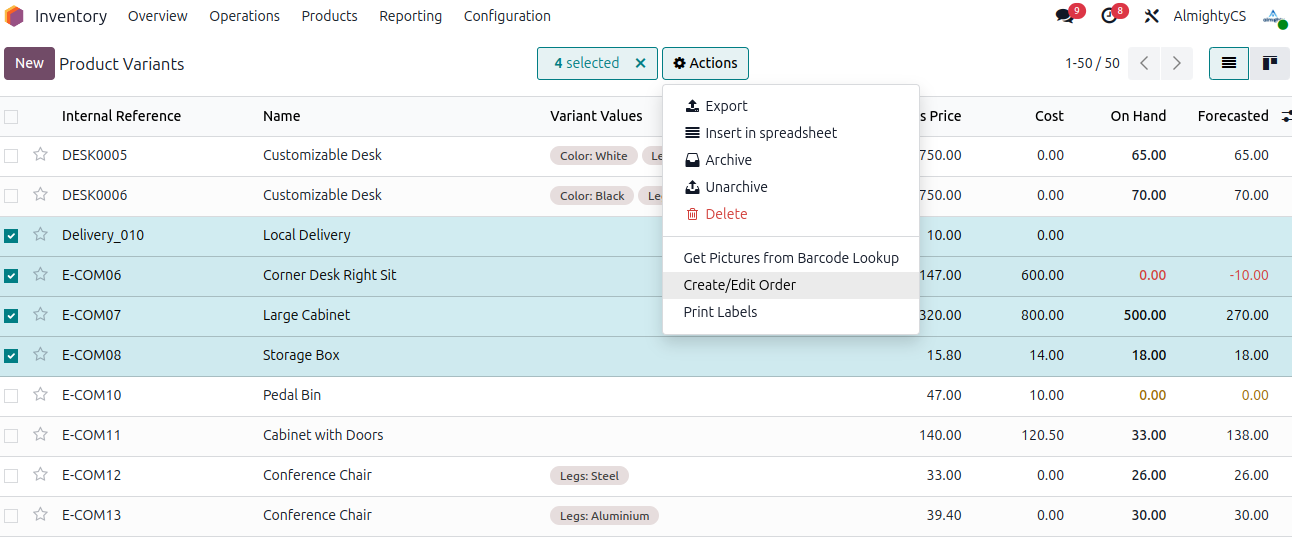
Fill in the necessary details to add the selected products to a new or existing order.
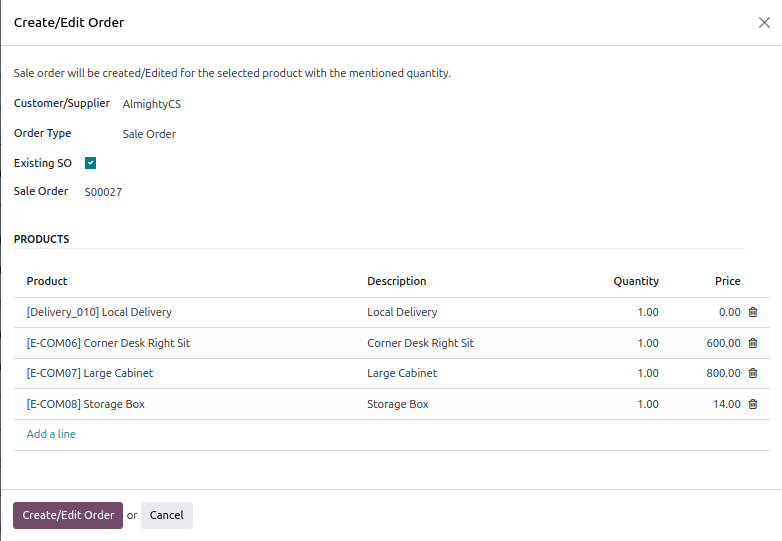
The system will automatically open the updated record for your review.

Configuration & Customization
Designed for Odoo ease-of-use, this module requires zero technical knowledge to deploy. Simply install and This module enables quick selection and addition of multiple products to invoices, sale orders, and purchase orders, making the process faster. Our dedicated technical team is available for advanced customization to match your hospital's specific protocols.